READMEs lie.
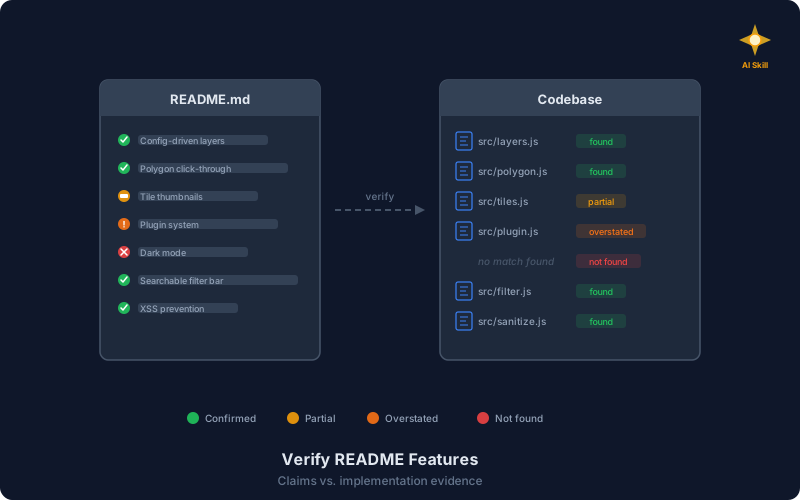
Not intentionally. But I caught mine in the act. I was auditing the README of Leaflet Atlas, a mapping library I maintain, when I realized the feature list had drifted. The README listed fourteen features. Two were overstated — the “plugin system” was internal-only with no public API. One was not found at all — dark mode had been planned but never implemented. These were not things I would have caught in a normal code review. The README had been accurate when written — features drifted over time as code changed and the docs did not follow.
I asked my AI coding assistant to verify the README against the codebase. The analysis was thorough — it found the gaps, classified each claim, and gave me evidence for every verdict. But that analysis lived in a single conversation, lost the moment I closed the session. I wanted to make it repeatable.
So I turned that one-off verification into the verify-readme-features skill — a reusable skill that turns any AI coding assistant into a documentation auditor. It reads your feature claims, searches the codebase for evidence, and reports what matches, what is missing, and what is overstated.
How the audit works#
The skill follows a five-step process that mirrors how a careful reviewer would approach the task.
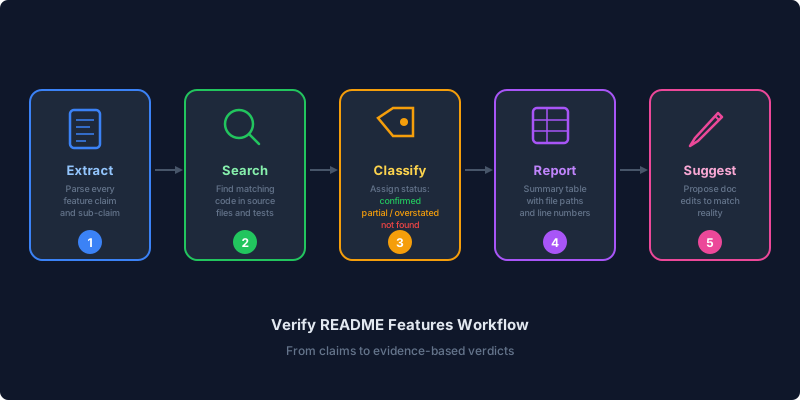
Step 1 — Extract claims. Read the documentation file and extract every feature claim. Not just top-level bullets — sub-claims too. If the README says “full-text search with fuzzy matching and highlighting”, that is three separate claims to verify: full-text search, fuzzy matching, and highlighting.
Step 2 — Search the codebase. For each claim, identify the keywords that would appear in an implementation (function names, config keys, CSS classes, module names), then search source files for matching code. The skill instructs the assistant to read the code, not just trust filenames — a file named search.js does not prove full-text search is implemented.
Step 3 — Classify each claim. Every claim gets one of four statuses:
| Status | Meaning |
|---|---|
| Confirmed | Implementation found that matches the claim |
| Partial | Implementation exists but does not fully match |
| Not found | No implementation found |
| Overstated | Implementation exists but the claim exaggerates its capabilities |
Step 4 — Report results. Present a summary table with the feature, its status, and the evidence — specific file paths and line numbers, not vague references.
Step 5 — Suggest fixes. For anything that is not confirmed, propose documentation edits that match reality. The user decides whether to fix the docs or implement the missing feature.
What counts as evidence#
The skill is explicit about what qualifies as evidence and what does not:
Valid evidence (ordered by reliability):
- Source code — actual implementation
- Test files — tests exercising the feature
- Configuration schemas — config keys referenced in claims
- CSS/style files — for UI-related claims
- Type definitions — for API surface claims
Not evidence: Documentation files. The README is the claim, not the proof. Other docs saying the same thing is circular, not confirming.
The sub-claim problem#
The most common audit failure is skipping sub-claims. A feature listed as “responsive layout with dark mode and accessibility support” contains four verifiable claims:
- Layout exists
- It is responsive (CSS breakpoints, media queries)
- Dark mode is implemented (toggle, CSS variables, theme switching)
- Accessibility support exists (ARIA attributes, keyboard navigation, contrast ratios)
Most manual reviews check claim 1 and move on. The skill forces verification of each sub-claim independently, which is where the real gaps surface.
What I have observed in practice#
After building the skill, I ran it on Leaflet Atlas again — this time automatically. Without the skill, asking an AI assistant to verify a README produces inconsistent results — different sessions focus on different claims, skip sub-features, or forget to check certain file types. With the skill, the process is the same every time. On this run, it matched my earlier findings but also caught a sub-claim I had overlooked: the README mentioned “keyboard shortcut support” for the filter bar, which existed but was undocumented in the API reference.
I have since run it on other projects in the agent-skills collection itself. The pattern is consistent — documentation written at the time of implementation tends to be accurate, but it accumulates small lies with every refactor that does not touch the docs.
The skill is most valuable in two scenarios:
Before a release. Running the audit before tagging a version catches documentation that is out of sync with the current state of the code. This is especially useful for open-source projects where users rely on the README to evaluate the project.
After a refactor. Large refactors often remove or change features without anyone updating the docs. Running the audit after a refactor surfaces claims that no longer hold.
The structured output — a table with status and evidence — also serves as a checklist for PRs that touch the README. If you change the feature list, run the audit to verify.
Antipatterns the skill prevents#
| Antipattern | What happens | What the skill does instead |
|---|---|---|
| Trusting filenames | search.js ≠ full-text search | Reads the code and verifies behavior |
| Counting docs as evidence | Circular reasoning | Only source code counts |
| Skipping sub-claims | Missing gaps in partial features | Verifies each sub-claim independently |
| Reporting without evidence | Unverifiable “confirmed” status | Always cites file and line number |
Installing the skill#
npx skills add https://github.com/rlespinasse/agent-skills --skill verify-readme-featuresOnce installed, ask the assistant to verify your README features, audit your feature list, or check documentation accuracy. The skill activates on keywords like “verify features”, “check feature list”, “confirm README”, or “audit feature accuracy”.
Trust but verify#
Since the Leaflet Atlas audit, I have been running the skill regularly on my other open source projects and on professional ones. It catches minor drifts every time — a renamed flag still listed under its old name, a feature that was split into two but still described as one. Nothing dramatic, but the kind of inaccuracies — and the occasional typo — that erode trust over time.
Good documentation is an asset. Inaccurate documentation is a liability — users lose trust, contributors waste time, and bugs get filed for features that were never implemented. I would rather have a tool catch it than a user.
The verify-readme-features skill does not make your docs accurate. It tells you where they are not, with evidence. What you do with that information is up to you.
Together with the diataxis skill, it forms my two-step check on the documentation side of every project: diataxis ensures the structure is right, verify-readme-features ensures the content is honest.
npx skills add https://github.com/rlespinasse/agent-skills --skill verify-readme-featuresThe skill is part of the agent-skills collection.