README is uppercase. It has been since the early Unix days, when filenames were capitalized so they would sort first in directory listings. GitHub uses README. npm uses README. The convention is universal in software.
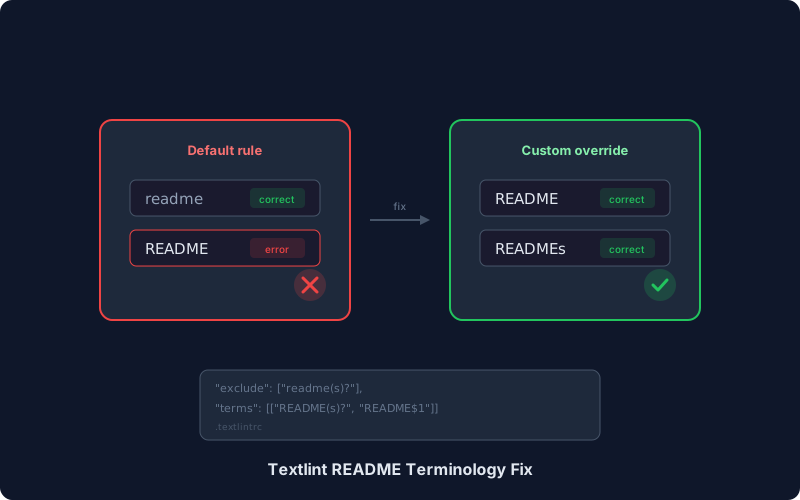
Yet the default textlint terminology rule maps README to readme — lowercase.
Every occurrence of README in documentation files gets flagged as incorrect.
The problem#
textlint-rule-terminology ships with a default term list that enforces lowercase readme for any variant of README.
18:1   error  Incorrect term: "READMEs", use "Readmes" instead  terminology
20:69  error  Incorrect term: "README", use "readme" instead    terminology
Disabling the terminology rule entirely is not an option — it catches real mistakes like file name vs filename or anti-pattern vs antipattern.
The goal is to override a single term while keeping everything else.
The fix#
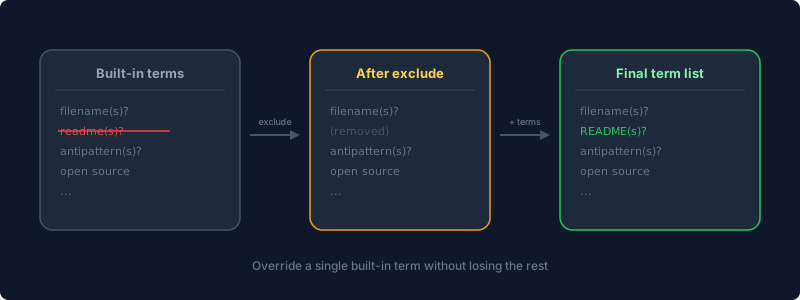
Add this to your .textlintrc:
{
  "rules": {
    "terminology": {
      "skip": ["Link"],
      "exclude": [
        "readme(s)?"
      ],
      "terms": [
        ["README(s)?", "README$1"]
      ]
    }
  }
}
Three key settings:
excluderemoves the built-inreadme(s)?pattern from the default term list. The value must match the regular expression pattern from the built-in list, not the replacement string.termsadds a custom replacement: matchREADME(s)?and replace withREADME$1, preserving the plural when present.skiptells the rule to ignore link nodes — without this, URLs containing “README” would also get flagged.
Super-Linter specificity#
When using Super-Linter, the .textlintrc must be placed in .github/linters/.textlintrc.
A .textlintrc at the repository root will not be picked up as a config file.
Common mistakes#
Using the replacement string in exclude.
Setting "exclude": ["README"] does nothing — the exclude matches against the regular expression pattern (readme(s)?), not the replacement.
Setting defaultTerms to false.
The defaultTerms option defaults to true, so it does not need to be set explicitly. Setting it to false removes all built-in terms — which defeats the purpose of using the terminology rule at all.
Verifying#
npx textlint --rule terminology docs/your-file.mdThe takeaway#
The textlint terminology rule is useful, but its built-in term list reflects general English conventions that do not always match software conventions.
When a built-in term is wrong for a project, exclude the pattern and terms the correct replacement — do not fight the linter by disabling the whole rule.