The “Native” Way#
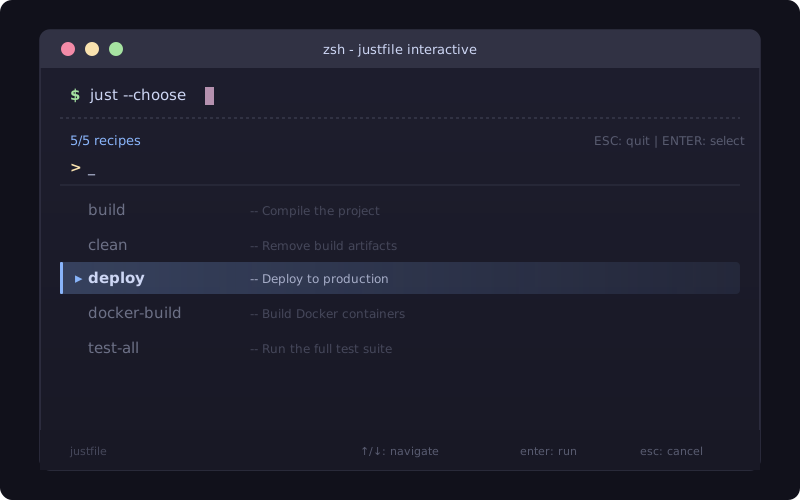
While you can manually pipe just --list into fzf, just has a built-in feature that handles this natively.
If you have fzf installed, you don’t need a custom recipe at all.
The One-Liner#
Simply run:
just --chooseThis command automatically parses your recipes, opens fzf, and executes your selection once you hit Enter.
Level Up with Shell Aliases#
If you find yourself running specific types of tasks frequently, you can combine just --choose with a shell alias.
This is perfect for filtering down to specific “namespaces” if you use a prefix naming convention (e.g., docker-build, docker-up).
Add this to your .zshrc or .bashrc:
# General interactive just
alias j='just --choose'

# Interactive just filtered for Docker tasks only
alias jd='just --choose --chooser "fzf --query=docker"'
Customizing the UI#
You can customize the look and feel of the chooser globally by setting the JUST_CHOOSER environment variable.
This allows you to add colors or change the layout without touching your justfile.
export JUST_CHOOSER='fzf --header "⚡ Select Task" --height 40% --layout reverse --border'Why this is better#
- Zero Boilerplate: You don’t need to pollute your
justfilewith a “menu” recipe. - Clean Output: It respects docstrings and ignores internal recipes (those starting with an underscore).
- Speed: It’s a single binary call rather than a chain of piped commands.
The “One-Touch” Justfile#
If you want the interactive menu to appear by default when you just type just in your terminal, add this to the top of your file:
# Run the interactive chooser by default
default:
@just --chooseConclusion#
Ultimately, using just --choose transforms your justfile from a static list of commands into a dynamic, user-friendly CLI.
By moving away from manual piping and embracing built-in flags and environment variables, you reduce maintenance overhead while significantly improving your daily terminal workflow.
Whether you’re automating a complex Docker environment or just looking for a faster way to trigger local builds, making your tools interactive by default ensures that your productivity stays as high as your command-line efficiency.