How a user issue opened my eyes#
I maintain github-slug-action, and one morning I woke up to issue #174: users were suddenly blocked because their organisation had enabled GitHub’s new policy requiring all actions to be pinned to a full-length commit SHA.
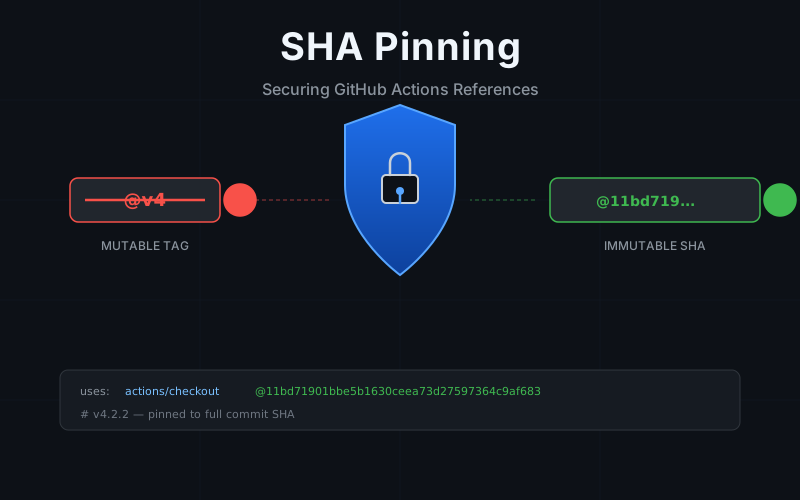
I already knew that pinning actions to commit SHAs was the right thing to do. Git tags are mutable: they can be deleted, moved, or recreated pointing to an entirely different commit. A compromised repository, a rogue maintainer, or even an honest mistake could silently swap the code your workflows execute, while the logs still show @v4 as if nothing changed. But when you maintain several open source projects on your own, free time goes to the bugs users are hitting right now, not to preventive security work that can always wait until next week.
That issue, combined with a bit more breathing room in my schedule, gave me the space to finally act on it.
What SHA pinning looks like#
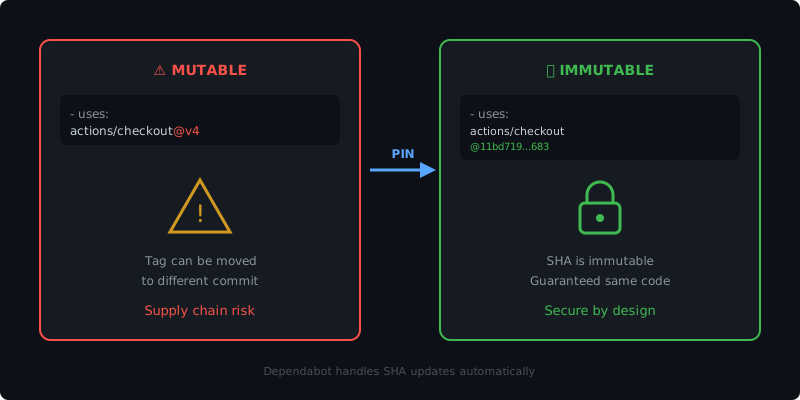
Instead of referencing an action by tag:
- uses: actions/checkout@v4You reference it by its full commit SHA:
- uses: actions/checkout@11bd71901bbe5b1630ceea73d27597364c9af683 # v4.2.2The commit hash is immutable. Once a commit exists in Git, its SHA cannot change without changing its content. Pinning to a SHA guarantees that your workflow runs exactly the code you expect, every time.
The trailing comment (# v4.2.2) is a convention that keeps the version human-readable.
It has no effect on execution: GitHub Actions resolves the SHA, not the comment.
GitHub’s immutable release policy#
SHA pinning used to be a best practice that teams adopted voluntarily. That changed when GitHub introduced an organisation-level policy that lets administrators enforce full commit SHA pinning for all actions used in their repositories.
When this policy is enabled, any workflow that references an action by tag (@v4, @main, or any other mutable reference) will fail with an error:
Error: The actions example/some-action@v1 are not allowed in your-org/your-repo
because all actions must be pinned to a full-length commit SHA.
This is a significant shift. What was once a recommendation is now something organisations can make mandatory across all their repositories.
The sub-action catch#
There is a subtlety to this policy that caught some users off guard: it applies to sub-actions as well, not just the actions you reference directly in your workflow files.
This is exactly what happened with github-slug-action.
The action internally references two sub-actions, rlespinasse/slugify-value and rlespinasse/shortify-git-revision, that were pinned by tag.
Users who enabled the SHA pinning policy in their organisation started seeing failures (#174):
Error: The actions rlespinasse/slugify-value@v1.4.0 and
rlespinasse/shortify-git-revision@v1.6.0 are not allowed in your-org/your-repo
because all actions must be pinned to a full-length commit SHA.
The users’ own workflow files were fine: they had pinned github-slug-action itself to a SHA.
But the policy checks the entire action dependency tree, including internal references that action consumers do not control.
This means that action maintainers need to pin their sub-actions too, or they block downstream users from adopting the policy.
The fix in practice#
In v5.5.0 (#175), all sub-actions referenced within github-slug-action were pinned to full commit SHAs.
Before:
- uses: rlespinasse/slugify-value@v1.4.0
- uses: rlespinasse/shortify-git-revision@v1.6.0
After:
- uses: rlespinasse/slugify-value@750260b26ed3c8e4db9b4833be0a0768a6508e54 # v1.4.0
- uses: rlespinasse/shortify-git-revision@14c50a2e4c952a5a9d29a4ee4bb39068af4a1e3d # v1.6.0
The workflow behavior is identical. Organisations with the SHA pinning policy enabled can now use github-slug-action without errors.
Keeping SHA pins up to date#
The most common objection to SHA pinning is maintenance: “How do I know when a new version is available if I am not using tags?”
Dependabot handles this. It understands SHA-pinned GitHub Actions and will open pull requests when new versions are released. The PR updates the SHA and the version comment together, so you get the same update experience as with tag-based references.
Enable it by adding this to your .github/dependabot.yml:
version: 2
updates:
  - package-ecosystem: "github-actions"
    directory: "/"
    schedule:
      interval: "weekly"
Dependabot will detect your SHA-pinned actions and propose updates with the new commit hash and version comment.
What this means for action maintainers#
If you maintain a GitHub Action that references other actions internally, you should pin those references to full commit SHAs. Your users may have adopted, or may be required to adopt, the organisation-level policy, and tag-based sub-action references will block them.
This is a small change on your side that unblocks an entire security posture for your downstream consumers.
Summary#
SHA pinning is moving from a best practice to an enforced policy. GitHub’s immutable release support means organisations can now mandate it across all repositories, and the policy checks the full dependency tree, including sub-actions that individual users cannot control.
If you consume third-party actions, pin them to SHAs and let Dependabot handle updates. You can also use the pin-github-actions-skill to streamline the pinning process. If you maintain actions, pin your sub-actions too: your users will thank you for it.